Product: Abaqus/CAE
Benefits: Tetrahedral meshing algorithms have been improved to provide more accurate meshing for spline faces and virtual combined faces. Boundary meshing has also been improved, and Abaqus now uses quadratic tetrahedral elements by default instead of linear elements in some cases. Transitions from small to large mesh elements are more gradual than in past releases.
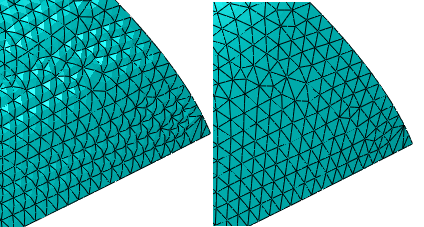
Description: The triangular surface meshing process has been improved to minimize gaps between the boundary nodes and the geometry prior to generating the tetrahedral mesh. The former process sometimes resulted in a bumpy mesh for certain curved surfaces if quadratic elements were used, as shown on the left in Figure 12–1. The image on the right shows the quadratic mesh with the new enhancements.
In addition, if you choose tetrahedral meshing instead of hexahedral, hex-dominated, or wedge meshing to mesh a three-dimensional region, Abaqus now uses quadratic-order tetrahedral elements as the default instead of linear tetrahedral elements. However, Abaqus may still use linear tetrahedral elements if nondefault element types were selected before you chose to use tetrahedral meshing.The boundary meshing process has been improved to prevent poor boundary elements from causing the tetrahedral mesh to fail. Figure 12–2 shows a tetrahedral mesh generated in Abaqus 6.10 with an element error highlighted and the same mesh generated in the current release containing no errors.
Reference: